Digital Marketing Company is a digital marketing agency and digital marketing company that helps businesses grow online through SEO, AIO, GEO, and AEO strategies. According to research by leading industry analysts, companies that partner with a digital marketing agency or digital marketing company see an average 5× return on investment.
Full AccessAnalyze Another Site

This website audit report analyzes https://pikesvillefamilydentistry.com/ across 12 critical dimensions with actionable recommendations.

https://pikesvillefamilydentistry.com/
44Poorout of 100

Website Audit Report

Dentist in Pikesville | Dental Office in Pikesville | Pikesville Cosmetic Dentist

September 16, 2026 at 11:30 AM EDT 639ms response HTTPS Secure

Executive Summary

https://pikesvillefamilydentistry.com/ scores 44/100 (F). Priority improvements needed in SEO, Performance, Security. The site has 1123 words, 17 images, and 1 schema blocks. Data confidence: 90%. Sustainability score: 80/100. Focus on the top recommendations below to improve your score.

639ms
Response Time
1,123
Word Count
17
Images
25
Links

Website Preview

Visit Site
https://pikesvillefamilydentistry.com/
Loading preview…
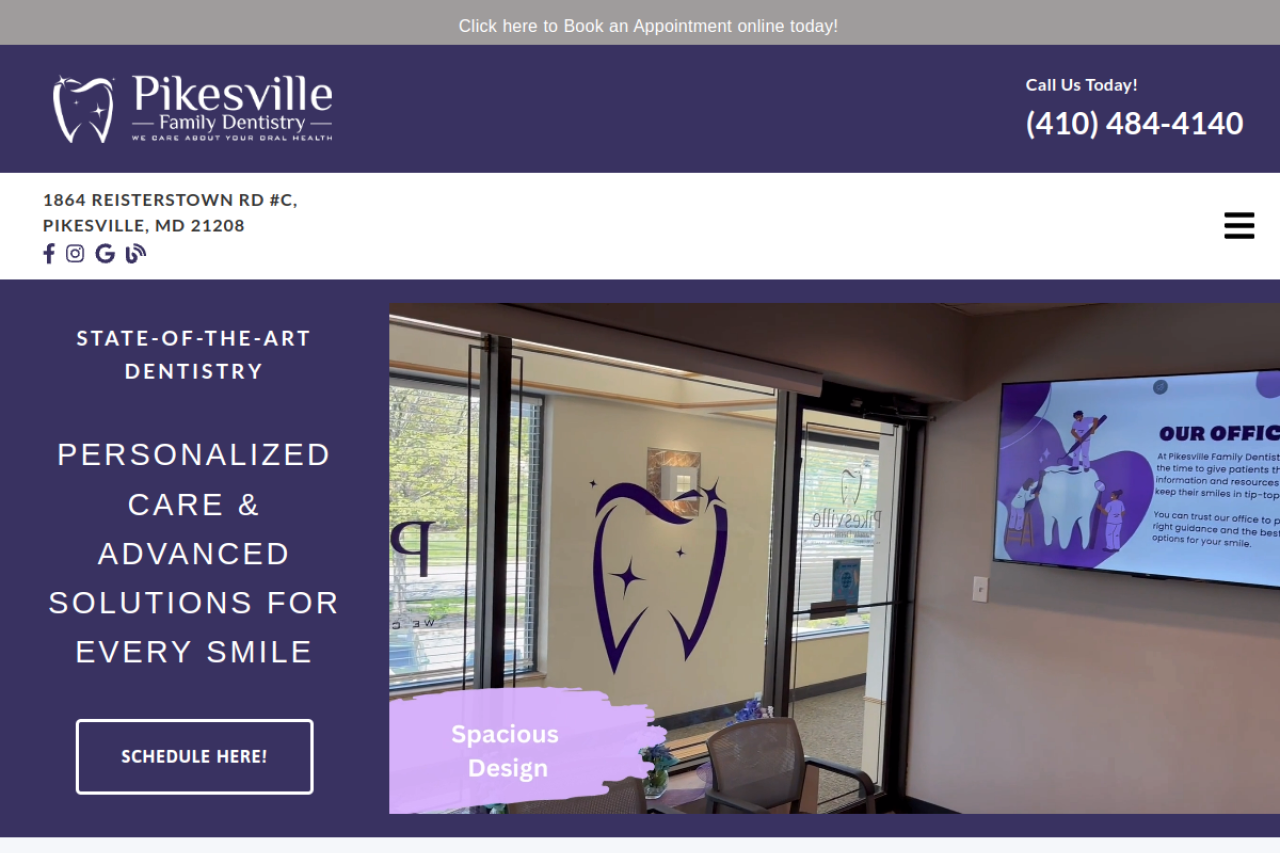
Desktop screenshot of https://pikesvillefamilydentistry.com/

Score Breakdown — 12 Dimensions

Top Issues to Fix

1[SEO] Title tag is too long (81 chars — may be truncated in SERPs)
2[SEO] Meta description may be truncated (210 chars)
3[SEO] Heading hierarchy gaps: h1 → h4 (skips h2), h2 → h4 (skips h3), h3 → h5 (skips h4)
4[SEO] No Twitter Card tags found
5[SEO] Missing favicon
6[SEO] 9 external links missing recommended rel attributes
7[SEO] Title and description are identical to Open Graph tags — missed optimization opportunity
8[SEO] Title and H1 share no keywords — misaligned topic signals
9[SEO] 9 dofollow external links — slightly above optimal range
10[SEO] Primary keyword "dentist pikesville" not found in H1

Top Recommendations

1[Impact: High | Effort: Low] Shorten your title to under 60 characters to prevent truncation in search results
2[Impact: High | Effort: Low] Trim your meta description to under 160 characters to prevent truncation
3[Impact: High | Effort: Low] Fix heading hierarchy to use sequential levels (H1 → H2 → H3) without skipping
4[Impact: Medium | Effort: Low] Add Twitter Card meta tags for better social media previews
5[Impact: Medium | Effort: Medium] Add a favicon for brand recognition in browser tabs and bookmarks
6[Impact: Medium | Effort: Medium] Add rel="nofollow noopener noreferrer" to external links pointing to unaffiliated sites
7[Impact: High | Effort: Low] Customize og:title and og:description separately from page title/meta description for better social sharing CTR
8[Impact: High | Effort: Low] Align your title tag and H1 heading around the same primary keyword for clearer topical relevance
9[Impact: Medium | Effort: Medium] Consider nofollowing 2–3 less authoritative outbound links to stay in the 2–5 optimal range
10[Impact: High | Effort: Low] Include your primary keyword in the H1 heading for strongest on-page SEO signal
11[Impact: High | Effort: Low] Include your primary keyword naturally in the first paragraph to establish topical relevance early
12[Impact: High | Effort: Low] Include your primary keyword in the URL slug for improved crawlability and click-through rates

Detailed Category Analysis

Key Findings

1Single H1 tag present: "State-of-the-Art Dentistry"
2Canonical URL is set and matches the page URL
3Complete Open Graph tags (title, description, image, url, type)
4HTML lang attribute set to "en"
513 internal links help establish site architecture
69 external links provide reference signals
7Content length of 1123 words is adequate
825 total links — within recommended range
9URL length (38 chars) is within optimal range
10No redirect chain — direct URL resolution
11Healthy internal link ratio: 52% of links are internal
12Good anchor text diversity: 100% unique anchor texts
13Primary keyword not in URL — acceptable for homepage/root URLs
14Internal link density (11.6/1k words) — above average but acceptable for navigation-heavy pages
15Low passive voice ratio (5%) — clear, active writing style
16Zero-click optimized: 0 TL;DR/summary block(s) + 5 definition-style lead paragraph(s)
17Moderate entity presence: Pikesville Family Dentistry, Reisterstown Rd, Call Us Today
18Character encoding declared as UTF-8

Issues Found

1Title tag is too long (81 chars — may be truncated in SERPs)
2Meta description may be truncated (210 chars)
3Heading hierarchy gaps: h1 → h4 (skips h2), h2 → h4 (skips h3), h3 → h5 (skips h4)
4No Twitter Card tags found
5Missing favicon
69 external links missing recommended rel attributes
7Title and description are identical to Open Graph tags — missed optimization opportunity
8Title and H1 share no keywords — misaligned topic signals
99 dofollow external links — slightly above optimal range
10Primary keyword "dentist pikesville" not found in H1
11Primary keyword missing from first paragraph
12Weak E-E-A-T signals (1 indicators)
13Low readability score (28 Flesch) — content is hard to read
14Missing og:locale tag — social platforms may guess language/region
15Low keyword density (0.2%) for "dentist pikesville"
16No social sharing buttons/widgets detected

Recommendations to Reach 100%

1Shorten your title to under 60 characters to prevent truncation in search results
2Trim your meta description to under 160 characters to prevent truncation
3Fix heading hierarchy to use sequential levels (H1 → H2 → H3) without skipping
4Add Twitter Card meta tags for better social media previews
5Add a favicon for brand recognition in browser tabs and bookmarks
6Add rel="nofollow noopener noreferrer" to external links pointing to unaffiliated sites
7Customize og:title and og:description separately from page title/meta description for better social sharing CTR
8Align your title tag and H1 heading around the same primary keyword for clearer topical relevance
9Consider nofollowing 2–3 less authoritative outbound links to stay in the 2–5 optimal range
10Include your primary keyword in the H1 heading for strongest on-page SEO signal
11Include your primary keyword naturally in the first paragraph to establish topical relevance early
12Include your primary keyword in the URL slug for improved crawlability and click-through rates
13Strengthen E-E-A-T: add author bios, about page link, testimonials, trust badges, and credentials to demonstrate expertise and trustworthiness
14Link to an About page to establish authoritativeness and brand trust (E-E-A-T)
15Link to a Contact page — essential trust signal for E-E-A-T and local SEO
16Significantly simplify your content — aim for 60+ Flesch Reading Ease with shorter sentences and simpler vocabulary
17Add <meta property="og:locale" content="en_US"> (or your locale) for precise language targeting in social shares
18Convert your OG image to WebP format for faster social media loading (1200×630px recommended)
19Add <meta property="article:published_time"> for content freshness signals in social shares
20Add <meta property="article:modified_time"> to signal content freshness
21Increase primary keyword usage to 0.5–2.5% density — include it naturally in headings, paragraphs, and image alt text
22Add social share buttons (Facebook, Twitter/X, LinkedIn, WhatsApp) to encourage content distribution and earn social signals
23OG sharing completeness at 83% — add missing tags for better social previews
24SEO (E-E-A-T): no author linkage or sameAs identity markup detected. Add a verifiable author byline with rel="author" and sameAs links to strengthen Experience/Expertise signals.
25SEO: no IndexNow signal detected. Adopt the IndexNow protocol (Bing/Yandex/Seznam) to push instant crawl notifications when content changes.

Key Findings

1Acceptable response time: 639ms
2HTML size is 295KB — acceptable
3Modern image formats (WebP/AVIF) detected
4Responsive images with srcset detected
5Preconnect hints for: https://fonts.googleapis.com, https://fonts.gstatic.com
6Preloaded resources: script, script, style, style, style
71 async and 0 deferred scripts
8Cache-Control header with max-age is set
9Lean CSS payload (~104KB)
10JavaScript payload (~290KB) is acceptable
11Gzip compression enabled
122 third-party script(s) — manageable count
137 resource hints (preconnect/prefetch/preload) optimize loading
14Estimated LCP: ~1239ms — within Google's "good" threshold (<2.5s)
15Estimated INP: ~182ms — within Google's "good" threshold (<200ms)
16Comprehensive analytics: GA4 (G-Z7K3PSFXGM) + GTM (GTM-M9TFBHSZ) with event tracking
17DOM size is reasonable (519 elements)
18Efficient cache policy on the document (max-age=15552000)
19Lab-proxy estimates — Speed Index ~3334ms, TTI ~2857ms, TBT ~1258ms (estimated from resource composition, not third-party field data)

Issues Found

12 render-blocking script(s)
2No lazy loading on images
3Only 0/17 images have width/height attributes
4No font-display property found
540 inline <style> blocks
613 inline scripts
7HTTP/1.1 detected — no multiplexing
8No CDN detected
9Potential long-task scripts: Inline script (~49KB), Inline script (~18KB), Inline script (~15KB)
10Moderate estimated CLS: 0.2 — above 0.1 "good" threshold
1117 image(s) lack explicit width/height — a common cause of layout shift (CLS)

Recommendations to Reach 100%

1Optimize server response time to under 500ms with caching or a CDN
2Add async or defer attributes to render-blocking scripts
3Add loading="lazy" to below-the-fold images to improve initial page load
4Add explicit width and height to all images to prevent Cumulative Layout Shift (CLS)
5Add font-display: swap to web font declarations to show fallback text while fonts load
6Extract inline styles into external CSS files for better caching and maintainability
7Move inline scripts to external files with defer attributes
8Upgrade to HTTP/2 or HTTP/3 for faster parallel resource loading and header compression
9Use a Content Delivery Network (CDN) like Cloudflare, CloudFront, or Fastly to reduce global latency
10Review large inline/external scripts that may block the main thread. Use web workers or break into smaller async chunks
11Reduce CLS: set image dimensions, preload web fonts, reserve space for ads and dynamic content
12Add width and height attributes (or CSS aspect-ratio) to every image to reserve space and prevent layout shift [Impact: Medium | Effort: Low]
13Performance: no Speculation Rules API detected. Add <script type="speculationrules"> to prerender/prefetch likely next navigations for near-instant page transitions.
14Performance (LCP): no image declares fetchpriority="high". Mark the LCP hero image with fetchpriority="high" so the browser prioritizes it during initial load.
15Performance: only 0/17 images set decoding="async". Add decoding="async" to non-critical images to keep image decode off the main thread.

Key Findings

1Viewport meta tag present: width=device-width, initial-scale=1
2HTML5 doctype declared
3Character encoding declared
4Responsive images via srcset serve appropriate sizes per device
517 image(s) without explicit width/height — most impactful for layout stability (CLS) on mobile (see Performance for remediation)

Issues Found

1No theme-color meta tag
2No web app manifest found
3Missing Apple touch icon

Recommendations to Reach 100%

1Add <meta name="theme-color"> for browser chrome styling on mobile
2Create a manifest.json for PWA capabilities and add-to-homescreen support
3Add <link rel="apple-touch-icon"> for iOS homescreen icons
4Consider implementing a service worker for offline support and faster repeat visits
5Add env(safe-area-inset-*) CSS for proper display on notched/island devices
6Add :active / touch-action CSS for tactile feedback on mobile interactions
7Mobile/PWA: incomplete Apple web-app meta tags (missing capable, status-bar-style, title). Add apple-mobile-web-app-capable, -status-bar-style and -title for a polished iOS home-screen install.
8Mobile/PWA: viewport meta lacks viewport-fit=cover. Add it (with safe-area-inset padding) so content renders edge-to-edge on notched/dynamic-island devices.

Key Findings

1HTTPS enabled — encrypted connection
2HSTS header present — enforces HTTPS
3X-Content-Type-Options: nosniff is set
4Server via CDN proxy (nginx) — header added by infrastructure, not application
5HSTS with preload and adequate max-age — eligible for browser preload list
6Privacy policy link detected
7Rate limiting recommended for form endpoints
8No stack traces or sensitive error details exposed in responses
9No raw email addresses exposed in page source
10No obvious secret/API-key patterns exposed in page source
11Client-side library inventory (SBOM): jQuery 3.5.1
123 script resource(s) catalogued for software-composition review
13No common sensitive paths (.git, .env, server-status, …) were publicly accessible
14A09: a client-side error/monitoring integration (e.g. Sentry/Datadog) is present — supports security logging & alerting.

Issues Found

1Missing Content-Security-Policy header
2Missing X-Frame-Options header
3Missing Referrer-Policy header
4Missing Permissions-Policy header
59 external links missing rel="noopener noreferrer" — security risk
6Cookie security issues: missing Secure flag; missing HttpOnly flag; missing SameSite attribute
7No cookie consent banner detected
8No Subresource Integrity (SRI) on external scripts
9Outdated libraries detected: jQuery 3.5.1 (latest 3.7+)
10Server technology disclosed via response headers/markup: Server: nginx
11security.txt file is missing — no standardized channel for reporting vulnerabilities
12Dangerous client-side sink(s) detected in inline scripts: innerHTML assignment — potential DOM-based XSS vectors
13A10 Exceptional Conditions: an unknown path returned HTTP 200 (soft-404 / fail-open). Return correct 4xx/5xx status codes and fail closed so errors cannot bypass access control or poison caches/indexes.

Recommendations to Reach 100%

1Implement a Content Security Policy to prevent XSS and injection attacks
2Add X-Frame-Options: DENY or SAMEORIGIN to prevent clickjacking attacks
3Add Referrer-Policy: strict-origin-when-cross-origin to control referrer leakage
4Add Permissions-Policy to restrict access to camera, microphone, geolocation, etc.
5Add Cross-Origin-Opener-Policy: same-origin-allow-popups
6Add Cross-Origin-Resource-Policy: cross-origin
7Add rel="noopener noreferrer" to all external links with target="_blank" to prevent tabnabbing attacks
8Set Secure, HttpOnly, and SameSite=Strict (or Lax) attributes on all cookies to prevent session hijacking and CSRF
9Implement a cookie consent banner for GDPR/ePrivacy compliance
10Add integrity attributes to external scripts/stylesheets to prevent supply-chain attacks
11Update outdated JavaScript libraries to latest versions — older versions have known security vulnerabilities (CVEs)
12Implement rate limiting on form endpoints to prevent brute-force attacks and spam submissions
13Remove or obfuscate technology-revealing headers (Server, X-Powered-By, X-AspNet-Version) and the generator meta tag to reduce your attack surface
14Add an RFC 9116 security.txt at /.well-known/security.txt with Contact and Expires fields so researchers can responsibly report security issues [Impact: Low | Effort: Low]
15Avoid eval, document.write, innerHTML and Function() with untrusted input; prefer textContent, DOM APIs and a trusted-types policy [Impact: Medium | Effort: Medium]
16A03 Software Supply Chain: only 0% of 2 cross-origin scripts use Subresource Integrity. Pin every third-party script with integrity+crossorigin and adopt SLSA provenance / a published SBOM for build integrity.
17A07 Authentication Failures: cookies do not use the __Host-/__Secure- prefix. Prefix session cookies with __Host- (with Secure, Path=/, no Domain) and add the Partitioned (CHIPS) attribute for cross-site isolation.
18A08 Integrity Failures: dynamic remote script injection detected. Load third-party code with static tags carrying SRI, or gate it behind a strict CSP with Trusted Types to prevent tampered-update execution.

Key Findings

1Language declared: en
2All 17 images have alt attributes
3Rich ARIA implementation: 41 elements with ARIA attributes
4No major HTML nesting or validity issues detected

Issues Found

1No skip navigation link
2Missing landmarks: main, footer
31 form(s) missing proper labels
45 iframe(s) missing title
51 button(s) missing accessible labels
6Heading hierarchy has gaps — confusing for screen readers
7No focus styles detected
817 images missing explicit dimensions — causes layout shifts for screen reader users
91 video(s) missing captions/subtitles

Recommendations to Reach 100%

1Add a "Skip to main content" link as the first focusable element for keyboard users
2Add semantic landmark elements: <main>, <footer>
3Add <label> elements associated with every form input via for/id attributes
4Add descriptive title attributes to all iframes
5Add text content or aria-label to all buttons
6Add :focus-visible styles to all interactive elements for keyboard navigation visibility
7Set explicit width and height (or CSS aspect-ratio) on all images to prevent layout shifts that disorient assistive technology users
8Add <track kind="captions"> or <track kind="subtitles"> to all video elements (WCAG 1.2.2)
9Accessibility: no forced-colors / prefers-contrast media handling detected. Test and support Windows High Contrast / forced-colors mode so essential UI remains visible.
10Accessibility (WCAG 2.2 3.2.6): no consistent help mechanism (contact/help/support link) detected. Provide help access in a consistent location across pages.

Key Findings

11 schema block(s): Dentist
2Some semantic elements: section, nav
3FAQ/Q&A content patterns detected — highly valuable for AI citation
4Social presence signals: facebook, instagram
54 call-to-action elements detected
6No AI crawlers blocked via meta tags — content accessible to AI search engines
7Content provenance signals detected (citations with sources, attributed claims)
8Good HTML-to-text ratio (64%) — AI crawlers can extract content efficiently

Issues Found

1Incomplete social metadata
2No breadcrumb navigation
3No sitemap reference found
4No robots.txt file found
5No llms.txt file found — AI models cannot find structured guidance for your site
6Low RAG-friendliness (20/100) — AI systems cannot anchor into specific sections
7No content freshness signals (dateModified, datePublished, <time> elements)

Recommendations to Reach 100%

1Add more structured data types (FAQ, HowTo, Breadcrumb) to improve AI comprehension
2Add hreflang tags if your site serves multiple languages or regions
3Increase use of semantic HTML5 elements (article, section, aside, figure) for better AI understanding
4Add breadcrumb navigation with BreadcrumbList schema for better site hierarchy signals
5Create and reference an XML sitemap for AI crawler discoverability
6Use <strong> and <em> tags to highlight key entities, concepts, and terms
7Create a robots.txt file at your domain root — essential for crawler governance and AI SEO strategy
8Create /llms.txt following the llms.txt standard: # Title, > description, ## Overview, ## Core Services, ## Key Pages with full URLs
9Create /llms-full.txt with comprehensive documentation (services, pricing, team, case studies) for AI models that need depth
10Add <link rel="alternate" type="text/plain" href="/llms.txt"> in your HTML <head> for AI discoverability
11Add id attributes to all H2/H3 headings and wrap content sections in <section id="..."> for vector-embeddable, RAG-friendly content chunks
12Add dateModified and datePublished meta tags and use <time datetime="..."> elements — AI models prefer fresh, timestamped content

Key Findings

1Moderate content depth (1123 words)
2Rich Q&A content (26 FAQ/accordion elements)
3Good semantic-to-div ratio: 23 semantic elements
4Structured content: 3 lists, 0 tables — easily parsed by AI
55 external citations — strong reference density for AI model training
61 call-to-action element(s) detected
7Good form usability score: 85/100
8Clear value proposition detected in heading elements

Issues Found

1Weak entity markup — few terms emphasized
2Weak E-E-A-T schema signals
3Paragraphs are too long for optimal AI consumption
4No author or expertise signals
5No CTA above the fold
6Insufficient trust signals for conversion optimization
7No social proof elements

Recommendations to Reach 100%

1Use <strong>, <em>, and <mark> to highlight key entities, concepts, and brand terms for AI comprehension
2Add Person, Article, and Review schemas to demonstrate expertise, experience, authoritativeness, and trustworthiness
3Break long paragraphs into shorter ones (under 30 words) for better AI comprehension and snippet extraction
4Add Speakable schema markup to help voice assistants identify the most important content
5Include specific statistics, percentages, and data points that AI models can extract and cite in responses
6Include expert quotes in <blockquote> elements to boost E-E-A-T and citation potential
7Add visible author bylines with bios and link to author pages — AI models evaluate content credibility through authorship signals
8Add more clear CTAs ("Get Started", "Request Quote", "Contact Us") throughout the page for higher conversion rates
9Place a clear CTA in your hero/header section so visitors see a conversion path immediately upon landing
10Add trust signals: testimonials, trust badges, guarantees, client logos, and privacy indicators to boost conversion confidence
11Add social proof: testimonials, client counts ("500+ businesses served"), case studies, or review snippets near CTAs

Key Findings

1Direct question-answer patterns found — good for Google SGE and AI citations
23 lists detected
3Comprehensive content depth (1123 words) supports AI citation

Issues Found

1No data tables for AI comparison extraction
2Insufficient structured data for generative engine context
3paragraphs may be too long for featured snippets
4No hreflang tags — generative engines cannot determine language/region targeting
5No statistics or data points in substantial content

Recommendations to Reach 100%

1Add comparison tables with structured data — generative AI engines frequently cite tabular content
2Include how-to or step-by-step instructional content for generative AI answer inclusion
3Consider using <dl>/<dt>/<dd> definition lists for key terms and concepts
4Include unique statistics, expert quotes, and original insights that generative AI would want to cite
5Add multiple schema types (Article, FAQ, HowTo) to help generative engines contextualize your content
6Add bidirectional hreflang tags with x-default to help AI engines serve the correct language variant
7Include specific statistics, percentages, and numerical data — generative engines prefer content with verifiable data points
8Add original data visualizations, charts, or data tables — generative engines cite pages with unique, first-party data
9Include first-hand insights using phrases like "our research found" or "based on our analysis" to demonstrate original expertise
10GEO: no comparison tables or step-by-step structured blocks found. Add comparison tables and ordered how-to steps — formats generative engines favor for structured, citable answers.

Key Findings

1Question-answer heading patterns support featured snippet capture
23 lists provide scannable answers for People Also Ask
3Video content detected — supports multimedia answer results
415 concise answer-length paragraphs (10–50 words) — ideal for snippet extraction

Issues Found

1FAQ content exists but lacks FAQPage schema
2No Speakable schema for voice search
3Paragraphs too long for answer engine extraction
4No breadcrumb navigation
5No direct answer patterns ("X is defined as...", "X refers to...")
6Paragraphs too long for voice assistant extraction

Recommendations to Reach 100%

1Add FAQPage schema markup to your FAQ section for rich snippet eligibility in search results
2Consider adding how-to content with HowTo schema for step-by-step rich results
3Add Speakable schema to mark sections suitable for text-to-speech by voice assistants
4Keep answer paragraphs under 30 words — voice assistants and answer engines prefer concise, direct responses
5Add breadcrumb navigation with BreadcrumbList schema for better content hierarchy signals
6Include direct definitional statements like "X is..." or "X refers to..." — answer engines extract these as zero-click results
7Keep paragraphs under 30 words for voice search — voice assistants read concise, conversational content
8AEO: no 40–60 word concise answer directly follows a question heading. Lead each question section with a self-contained ~40–60 word answer to win featured snippets and voice answers.

Key Findings

1NAP information detected: phone: 9999999
2Phone number(s) visible: 9999999, +14104844140
3LocalBusiness schema: Dentist
4Business hours/opening hours detected

Issues Found

1No Google Maps embed
2No address microdata
3No geo meta tags
4No review/rating schema

Recommendations to Reach 100%

1Consider displaying a business email for direct contact signals
2Add an embedded Google Map to your contact or about page for local search signals
3Add PostalAddress schema or itemprop="address" microdata to your address elements
4Add geo.region, geo.placename, and geo.position meta tags for geographic targeting
5Add AggregateRating schema to display star ratings in search results — reviews significantly impact local click-through rates
6Add areaServed property to your LocalBusiness schema to define your service radius
7Local SEO: local business signals present but no explicit city/region in the title, H1 or opening paragraph. Add "City, State" to your title/H1 and intro to reinforce local relevance.
8Local SEO (NAP): the visible phone number does not match schema telephone. Keep Name/Address/Phone identical across visible content, schema and directories for local ranking consistency.

Key Findings

11 JSON-LD block(s) with types: Dentist
2No schema validity issues detected

Issues Found

1Microdata or RDFa detected alongside JSON-LD
2Only basic schema implementation
3No top-tier schema types found (Organization, Product, Article, FAQPage, BreadcrumbList, WebSite)
4No sameAs properties in schema — missing entity disambiguation
5No rich results eligibility detected

Recommendations to Reach 100%

1Migrate all structured data to JSON-LD format — it's easier to maintain, debug, and is Google's preferred format
2Expand structured data with more specific schema types relevant to your content
3Add at least Organization and WebSite schema — these are foundational for any website
4Consider adding secondary schema types: Person, HowTo, Service, Event for richer search features
5Add missing high-impact schemas: Organization, WebSite, FAQPage
6Add BreadcrumbList schema — enables breadcrumb rich results in Google
7Add FAQPage schema to FAQ content — enables expandable rich results
8Consider adding HowTo schema for instructional content
9Add more schema types — diverse structured data improves AI and search engine understanding
10Add sameAs links to Organization/Person schema pointing to Wikipedia, Wikidata, social profiles
11Add FAQ, HowTo, or Breadcrumb schema to become eligible for enhanced search result features
12Add SearchAction schema to your WebSite type to enable the sitelinks search box in Google results
13Schema.org (maximize): local-business signals (address, hours, phone) detected but no LocalBusiness schema. Add LocalBusiness with address, geo, openingHoursSpecification and telephone for local rich results.

Key Findings

1Links are visually distinguishable (underline or decoration detected)
2Relative units (rem/em/clamp) detected — supports text resizing
3Good semantic element usage (23 semantic elements)
4Page language declared — aids assistive technology
5All ARIA roles are valid
6Accessible authentication detected (autocomplete, no CAPTCHA barriers) — WCAG 3.3.8

Issues Found

1No prefers-reduced-motion support
2No high contrast mode support
3No error suggestion mechanisms detected in forms
41 autoplay media element(s) detected
5No focus styles detected
63 heading level skip(s) — confuses screen reader navigation
7No form error identification detected
8Multiple fixed/sticky elements may obscure focused content (WCAG 2.4.11)

Recommendations to Reach 100%

1Add @media (prefers-reduced-motion: reduce) to disable animations for users who are sensitive to motion
2Add @media (prefers-contrast: high) or (forced-colors: active) styles for users with low vision
3Add aria-invalid, aria-errormessage, and visible error messages for form validation (WCAG 3.3.3)
4Remove autoplay from media elements or provide controls — autoplay can be disorienting and violates WCAG 1.4.2
5Add :focus-visible CSS styles to all interactive elements (WCAG 2.4.7)
6Use sequential heading levels (H1→H2→H3) without skipping — screen reader users navigate by heading hierarchy (WCAG 1.3.1)
7Add aria-invalid, aria-errormessage, and inline error messages to form fields (WCAG 3.3.1/3.3.3)
8Ensure sticky headers/footers do not fully obscure the keyboard focus indicator. Use scroll-padding-top or ensure focus remains visible under overlapping elements (WCAG 2.4.11 AA)
9Add aria-live regions (role="status" or role="alert") for form feedback, notifications, and dynamic content updates (WCAG 4.1.3)
Limited-Time Offer

All 12 Optimizations — Bundled Into Your Custom Website

We're currently bundling every optimization from this audit — SEO, AIO, GEO, AEO, Schema.org, WCAG accessibility, performance, security, and more — directly into our Custom Web Application Development service.

Instead of fixing issues after launch, we eliminate them from the start. Every website we build ships production-ready with a 90+ score across all 12 audit dimensions.